GUIDE
Quantity takeoff
from a PDF drawing.
A PDF takeoff turns a drawing into lengths, areas, volumes and counts. In Redline PDF, calibrate each page, mark each quantity, deduct openings, then review the totals and rates before exporting.
How do you do a takeoff from a PDF?
- Check the sheet number and revision, then calibrate a known dimension.
- Use Length, Area, Volume or Count for the quantity you need.
- Separate deductions from gross quantities and group by material or subject.
- Apply a rate per displayed unit, with an explicit waste allowance.
- Check the quantities against the marked drawing, then export a CSV or PDF.
Redline PDF includes takeoff in Pro and in the 30-day Pro trial. The sample demo lets you explore tools; saving and downloads require an account.
Start with the measurement scope
Write down what you are measuring before tracing the plan. Flooring usually follows the finished room boundary. Skirting follows wall length but omits door openings. A lighting count follows a symbol type and its legend, not every small rectangle on the page. These can all come from one sheet, but they are different quantities and need separate subjects.
Use names such as GF / Living / Floor finish F01 and GF / Living / Skirting S01. Keep the drawing revision and any exclusions in the review notes. If a specification changes the material, that note tells the next estimator which rate must change. This is more useful than a long list of unnamed polygons.
Calibrate and check a second dimension
A printed 1:100 label is only reliable if the PDF has retained its intended paper size. Use Calibrate to mark a dimension whose real length is known, then enter the distance and unit. Check a different dimension elsewhere on the sheet before starting. Repeat for each page; a detail at 1:20 cannot share a plan's 1:100 calibration.
For example, a line that spans 60 mm on paper and represents 6,000 mm is at 1:100. At that scale a 45 mm line represents 4,500 mm. A 60 by 45 mm rectangle therefore represents 6 by 4.5 m, or 27 m². Zooming on screen should not change that result. If the second known dimension disagrees, resolve the scale or scan distortion before trusting an area. See the calibration guide.
A worked room takeoff
This is an illustrative estimate, not a quoted project rate. Assume a rectangular room is 6 m by 4.5 m, a 2 m by 1.5 m opening is excluded from flooring, one 0.9 m door interrupts the skirting, and there are six fixtures. Assume all other wall lengths receive skirting. The rates below are deliberately simple so you can check the arithmetic.
| Item | Calculation | Net quantity | Allowance and rate | Amount (USD) |
|---|---|---|---|---|
| Floor finish | (6 × 4.5) − (2 × 1.5) | 24 m² | 10% waste; $28/m² | $739.20 |
| Skirting | 2 × (6 + 4.5) − 0.9 | 20.1 m | 0% allowance; $8/m | $160.80 |
| Fixtures | 6 individually checked symbols | 6 each | 0% allowance; $45/each | $270.00 |
| Illustrative total, excluding tax and other work | $1,170.00 | |||
The flooring estimate is 24 × 1.10 × 28 = $739.20. The measured floor remains 24 m²; the purchasing allowance is 26.4 m². Do not redraw the room larger to account for waste. Keep the measurement checkable and apply the allowance separately. Pack sizes, minimum orders, labor, overhead and tax need their own review; the table does not include them.
Choose the tool that matches the boundary
Use Area to trace a floor perimeter with corners you can see. Dynamic Fill can help with an enclosed region, but inspect its boundary: a door gap can let the fill escape, and furniture lines can split a room. Correct the boundary before adding a deduction. Use Length for a straight run, or Polylength for a route with changes of direction. A Count is one verified item, even if the symbol contains several lines.
For concrete, multiply a checked area by the specified depth in compatible units. A 24 m² area at 150 mm thickness is 24 × 0.15 = 3.6 m³ before allowances. The drawing alone does not establish that thickness: refer to the detail or specification and record the assumption. Read more about areas and openings.
Review symbol matches before counting
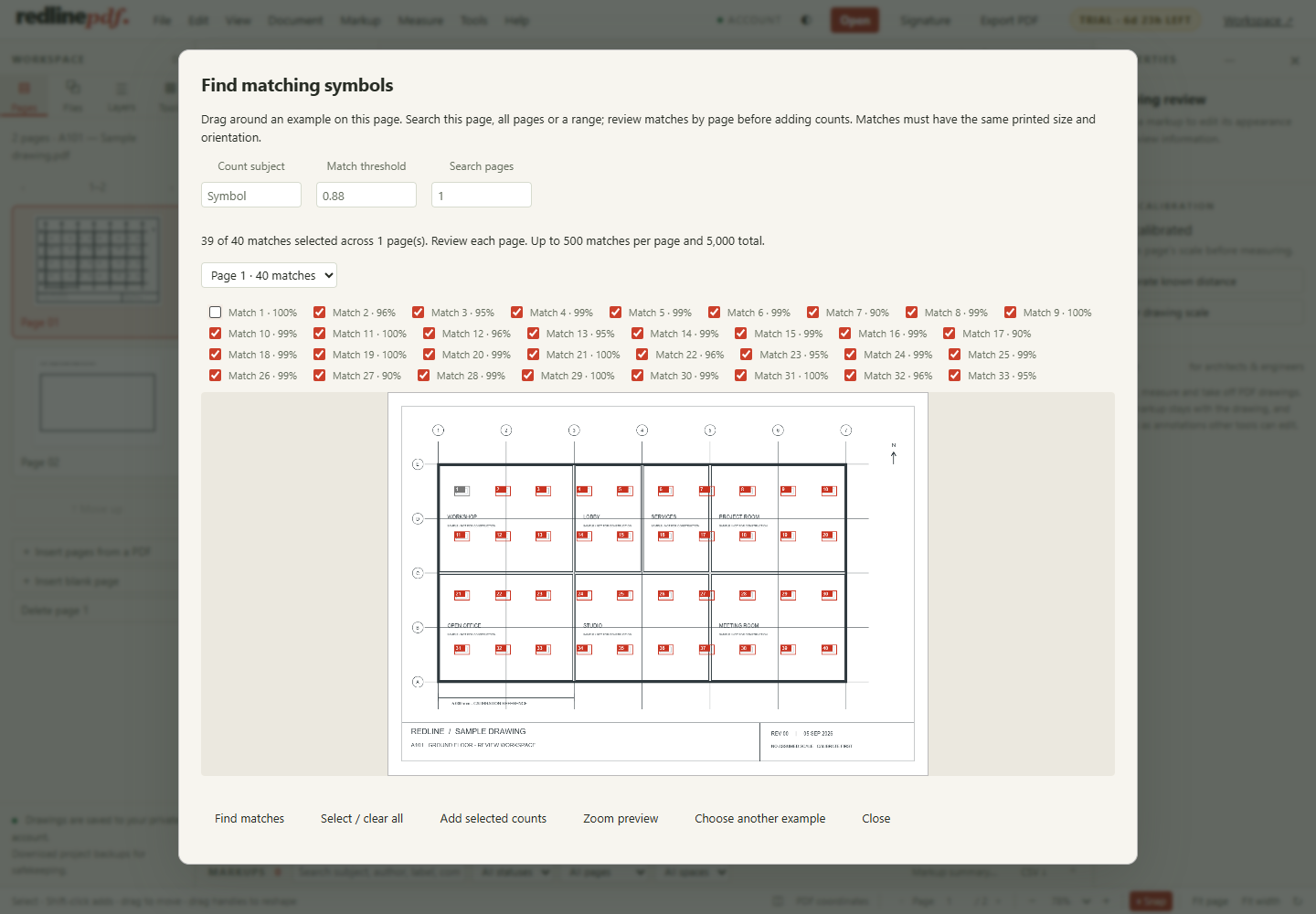
Redline PDF can search a selected symbol across chosen pages. The result is a set of candidates to review, not a certified quantity. Similar graphics, different symbol sizes, rotation and poor scans can create misses or false matches. Check the legend, remove unwanted results and inspect pages that use a different convention. Keep manually placed counts and search results from duplicating the same object.
Apply rates and inspect what is unpriced
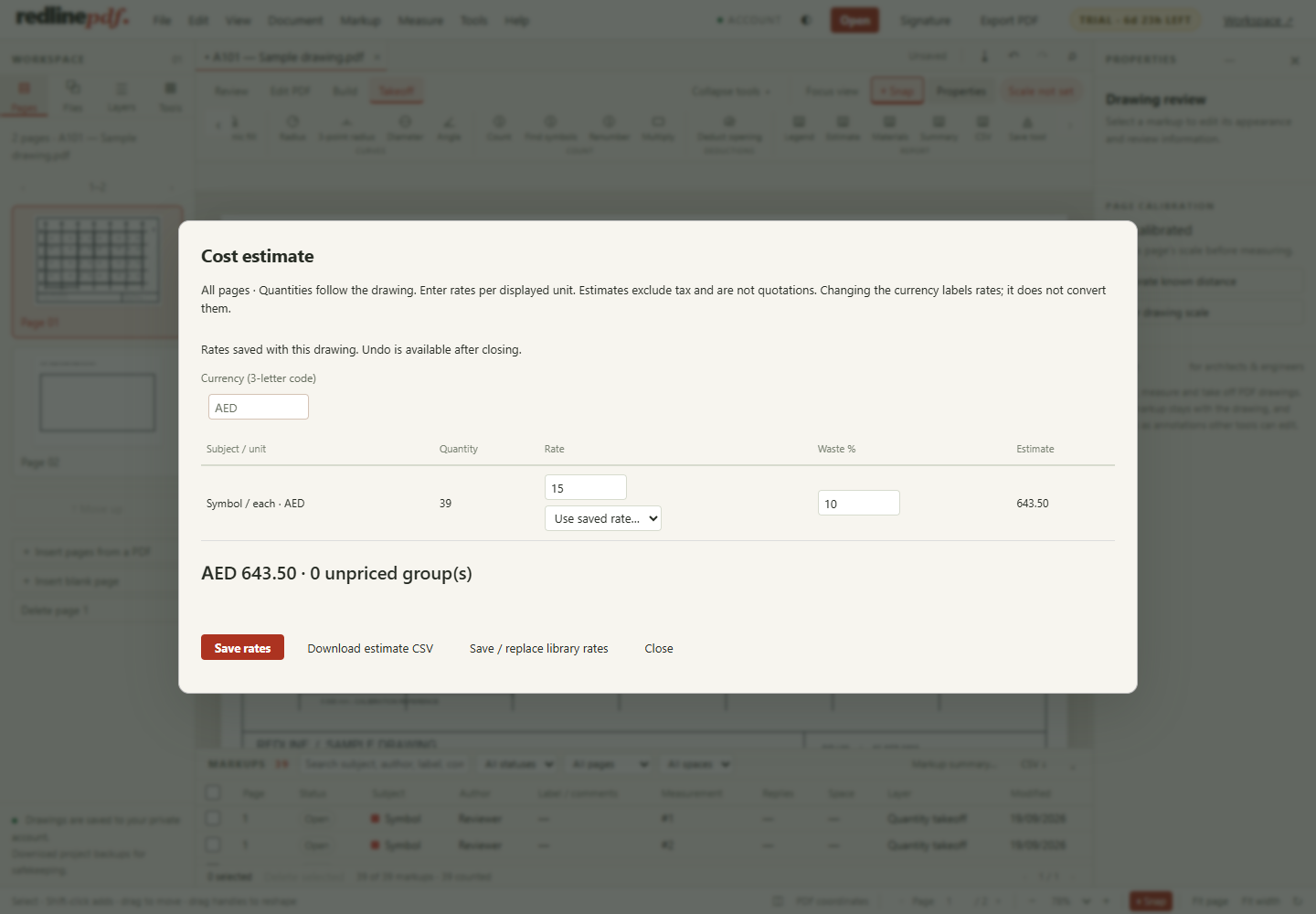
Open Cost estimate after the quantities are organized. Enter a rate for each subject and displayed unit. A price per square metre is not a price per square foot: confirm the measurement unit before applying a saved material rate. The currency field labels the estimate; it does not convert exchange rates. Reusable rates save repeated entry, but review their date, scope and unit for every project.
Hand over the evidence with the quantity
Export a CSV for the estimate and a marked PDF so another reviewer can locate each quantity; the drawing review workflow covers status and replies. Use editable annotations if the receiver needs to continue reviewing, or a flattened PDF for a fixed visual record. Open the exported file in the receiver's PDF viewer and spot-check a length, an area, a deduction and a count. A spreadsheet total without its drawing revision is difficult to audit.
Keep a copy of the reviewed project before starting the next revision. Compare the changed areas, update affected measurements, and re-check rates rather than assuming that a saved quantity is still current. Redline PDF supports individual review and takeoff; it does not provide OCR or live multi-person review sessions. See the product capabilities and limits, and measure your own PDF in the free measuring tool before you decide; the plans are on the pricing page.
Can you do a quantity takeoff directly from a PDF?
Yes, once the sheet is calibrated against a dimension you know. From there, lengths, areas, perimeters, volumes, angles and counts are exact arithmetic on the points you place, with deductions subtracted visibly and totals subtotalled by subject. What a PDF cannot give you is anything the drawing does not show: a slab thickness has to come from the detail or the specification, not from the plan.
How accurate is a takeoff measured off a PDF?
As accurate as the calibration and the clicking. Calibrate against the longest printed dimension available, then check a second one before measuring anything; if the two disagree, resolve the scale before trusting a quantity. On a scanned sheet the paper may have stretched, so treat small discrepancies as that sheet's noise rather than a fact about the building.
Can I export takeoff quantities to Excel?
Yes. The summary exports as a CSV carrying every measurement, its subject, its space and the unit it is reported in, which opens directly in Excel or any spreadsheet. A markup summary with subtotals can also go out as a PDF for the record.
Should waste be added to the measured quantity?
Add it as a separate allowance on top, never by redrawing the room larger. Keeping the measured quantity and the purchasing allowance apart is what lets someone check the measurement against the drawing later. A 24 m² floor with a 10% allowance is 24 m² measured and 26.4 m² purchased.
Next guide
Try it on the sample drawing
Redline runs in the browser — nothing to install. Open the demo to try tools on a sample drawing. Demo edits are temporary; your own files, saving, signatures, exporting, printing and downloads come with an account, which starts with 30 days of Pro, no card. Then Free unless you choose Plus or Pro; your drawings stay. Plus is $9 a month or $90 a year; Pro is $15 a month or $150 a year. Compare the plans.
More: all guides