GUIDE
Calibrating a
PDF drawing.
Measurements are only as good as the calibration behind them. This takes a minute per sheet and saves an argument later.
How do you calibrate a PDF drawing to scale?
- Find a distance on the sheet whose real length you know: a printed scale bar, a grid spacing, a written dimension.
- Click its two ends and type the real distance and unit — or, if you trust the plot, enter the drawn ratio such as 1:100 or 1/4" = 1'-0".
- Check it: measure a different known dimension and compare. A scale error shows up immediately and costs nothing to fix now.
- Repeat for every sheet. A detail at 1:20 will happily accept a plan's 1:100 and return numbers five times wrong.
A PDF stores geometry in points, not metres, so until a sheet is calibrated every measurement taken from it is meaningless.
Why a PDF needs calibrating
A PDF stores geometry in points (1/72 of an inch on paper), not in the metres or feet of the building. A plan printed "at 1:100" on A1 and the same plan printed to fit A3 hold identical drawings at different sizes. Calibration tells the tool how many real-world units one paper unit represents — for that sheet. Any review that quotes a dimension depends on it, which is why the drawing review workflow calibrates before it measures.
Method 1 — enter the drawn scale
If the title block states the scale and the sheet has not been resized, enter it: 1:100, 1:50, 1:200, or an imperial ratio such as 1/4" = 1'-0". Redline offers the common metric and imperial presets and accepts any ratio. This is quickest, and correct when the PDF really is at the printed size.
Method 2 — click a known distance
When the sheet may have been scaled (fit to page, reprinted, scanned), calibrate by measurement: click the two ends of something with a known length — a dimension string, a grid spacing, a door leaf you are sure of — and type the real distance. This is the more reliable method because it does not trust the title block.
Check it
After calibrating, measure a second known dimension somewhere else on the sheet. If it reads right, the sheet is right. If it is off by a constant factor, the sheet was resized: use method 2. If it is off in one direction only, the drawing was stretched and needs a separate X and Y scale.
Every sheet, every time
Calibration belongs to the page, not the file. A drawing set mixes plans at 1:100, details at 1:20 and a site plan at 1:500; measure from an uncalibrated page and the numbers are meaningless. Redline stores the calibration with each page, shows the scale in the status bar, and marks pages that still need it.
Units
Choose the unit you report in — millimetres, metres, feet and inches — once. Everything measured on the sheet is reported in it, whatever the scale, and the CSV export carries it. With the sheet set, measure an area or work through a full quantity takeoff. You can calibrate your own PDF in the free measuring tool, with nothing to sign up for. Calibrating with length and area comes with Plus, full measurement with Pro, and both with the 30-day trial; the plans are listed.
Why does a PDF drawing need calibrating at all?
Because a PDF stores geometry in points — 1/72 of an inch on paper — and knows nothing about metres or feet. The scale printed on the sheet describes the plot it came from, and a PDF that has been resized, re-plotted to another paper size or scanned no longer matches it. Calibrating ties the page back to the building.
Can I just type in the drawing's scale instead?
You can, and where you trust the plot it is quicker. It relies on the sheet still being at the size it was plotted at. Clicking a known distance does not rely on that, which is why it is the safer of the two and the one to use on anything scanned or resized.
Does every page need calibrating separately?
Yes. Sheets in one set are routinely plotted at different scales, and a detail at 1:20 beside a plan at 1:100 will accept the plan's calibration and hand back numbers that look plausible and are five times wrong. Redline PDF keeps calibration per page and marks an uncalibrated one "Scale not set" rather than guessing.
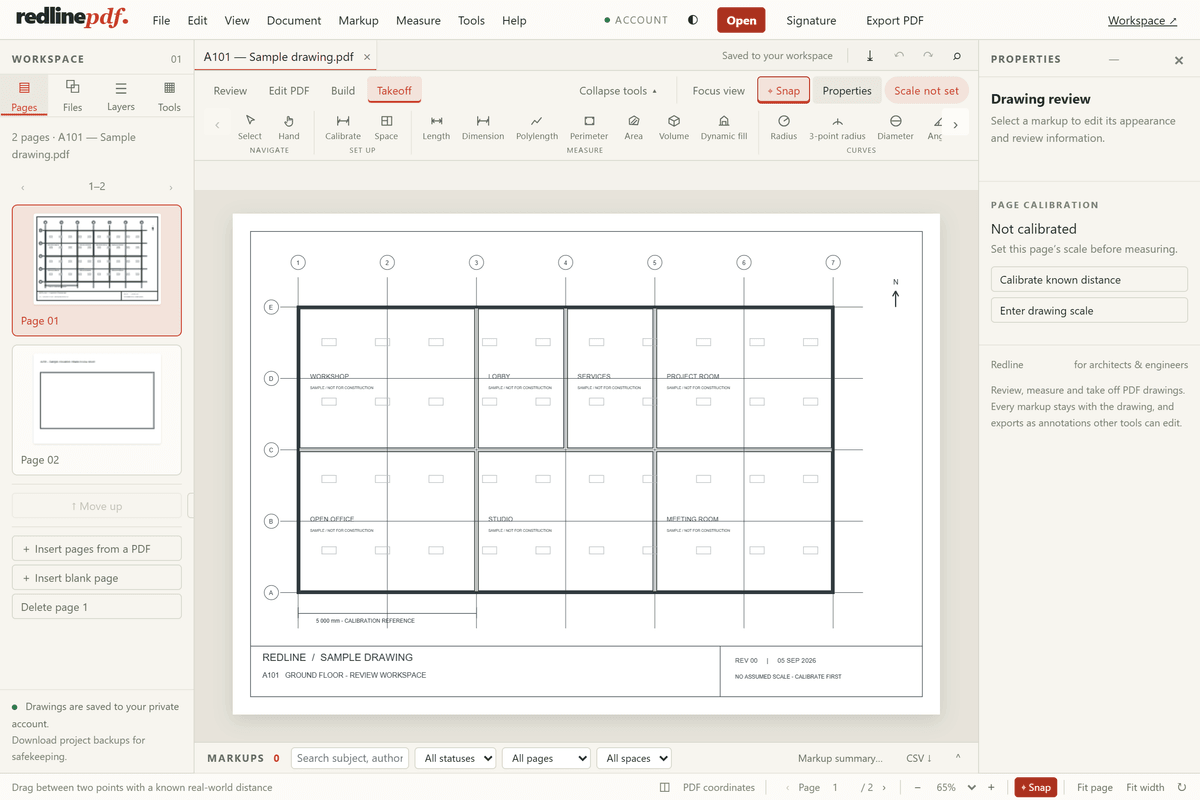
Check the calibration before you trust it
Set the scale, then measure something else you already know — a door leaf, a grid spacing, a dimension written on the sheet — and compare. On the sample drawing the grid is printed at 5 400 mm; after calibrating against the 5 000 mm bar it should come back within a few millimetres. If it does not, the calibration line was drawn to the wrong points, or the sheet is not at a uniform scale.
Why each sheet needs its own
A calibration belongs to the page it was made on. Sheets in one set are often plotted at different scales, and a detail at 1:20 sitting beside a plan at 1:100 will happily accept the plan's scale and hand you numbers that look plausible and are five times wrong. Redline PDF keeps the calibration per page for that reason, and marks a page without one as "Scale not set" rather than guessing. Rotating the view changes nothing underneath, so a calibration made before rotating still holds after it.
Next guide
Try it on the sample drawing
Redline runs in the browser — nothing to install. Open the demo to try tools on a sample drawing. Demo edits are temporary; your own files, saving, signatures, exporting, printing and downloads come with an account, which starts with 30 days of Pro, no card. Then Free unless you choose Plus or Pro; your drawings stay. Plus is $9 a month or $90 a year; Pro is $15 a month or $150 a year. Compare the plans.
More: all guides