Draw what
you mean.
Walls with thickness. Doors with swing. Windows with width. Place building elements, then refine the details.
THE PDF WORKSPACE FOR ARCHITECTS & ENGINEERS
Cloud a change. Check a measurement. Send a clear review.
Redline PDF brings drawing review, editing and takeoff into one focused workspace.
30 days of Pro No credit card Free plan afterward
THE EDITOR ON THE SAMPLE DRAWING
One length and two room areas, measured after calibrating to the printed 5 000 mm reference on sheet A101. Each one is a row in the markups list with its page, status, layer and value, ready to take out as CSV. Open the same sample in the demo →

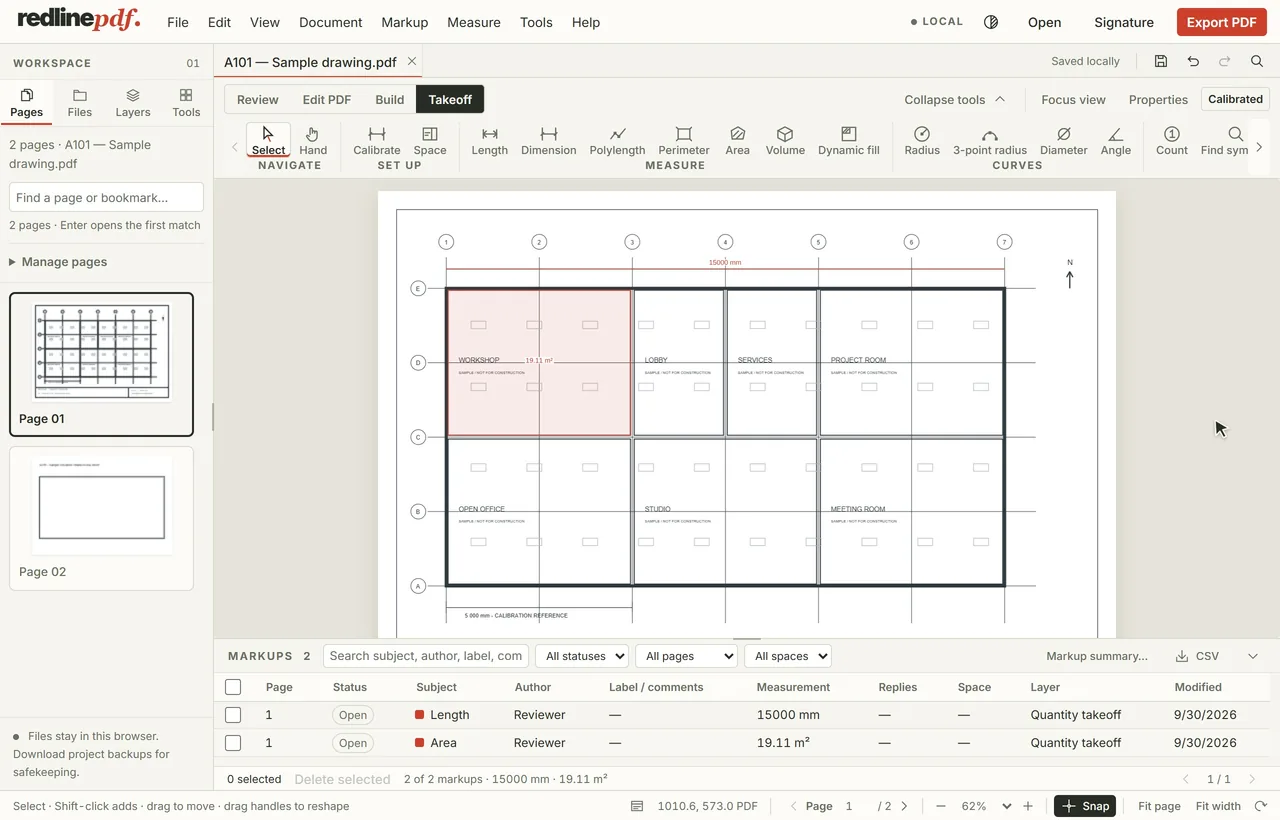
Illustrative apartment workspace — explore Review, Measure and Build above. Try the real editor on a sample drawing
A SIMPLER WAY TO WORK
Explore the sample first, then start your trial to work with your own PDFs.
See product features and limits →BUILT AROUND YOUR DISCIPLINE
02 / THE TOOLKITWalls with thickness. Doors with swing. Windows with width. Place building elements, then refine the details.
Columns, pipes, ducts and risers, with size controls that speak your language.
Lengths, areas, volumes and continuous counts. Turn drawing details into quantities you can review.
START FREE. CHOOSE WHAT FITS.
Free for review markup, Plus for clean review sets with length and area, Pro for full takeoff. Every account starts with 30 days of Pro, no card. Then Free unless you choose Plus or Pro; your drawings stay. The Revu 20 switch offer runs for accounts opened by 31 January 2027.
No card is taken, so the trial ends without charging you. Taxes and the exact amount in your currency are shown at checkout, before you confirm.
Compare the plans in fullRedline and Bluebeam RevuRedline and Adobe Acrobat
$0for as long as you like
No card, ever
Starts with 30 days of Pro. Stay on Free afterward without paying.
$9USD / month
Billed $9 monthly · $108 over 12 months
$90USD / year
Billed $90 yearly · equivalent to $7.50 a month
Counts, volumes, building elements and the CSV are on Pro.
$15USD / month
Billed $15 monthly · $180 over 12 months
$150USD / year
Billed $150 yearly · equivalent to $12.50 a month
No card to start. When the trial ends you keep Free, or choose a plan.
Every plan includes 2 GB of workspace storage, including saved versions. PDFs can be up to 300 MB each. Prices are USD; taxes and the final charge are shown at checkout.
No automatic charge. Your account becomes Free unless you choose and pay for a plan. Signing up does not start a paid subscription.
Your drawings stay. If you saved more than 3 during the trial, you keep them and can continue reviewing them. Free limits adding new drawings; it does not delete your work.
Upgrade when the work needs it. Plus adds clean or editable exports, printing and calibrated length and area; Pro adds full takeoff and PDF content editing. Cancel a paid plan from your workspace; access continues for the period already paid for.
THE SHORT VERSION
Redline PDF is browser-based PDF markup and quantity takeoff software for architects, engineers, contractors and estimators. Drawings are rendered, marked up and measured in the browser itself; opening or uploading a PDF in your signed-in workspace saves it to your account automatically.
Use the sample demo on your preferred browser and device. Start a trial to check your own PDFs, saving and exports. A desktop gives precise takeoff work more room.
Contact Redline PDF support, or send feedback from Help in the app. Read patch news to see what changed.
Drawings are private to your account and encrypted on the server. Read our privacy policy and refund policy.
Three ways of working on a PDF drawing, and what each is actually for.
| What is being compared | Redline PDF | Desktop review suites | General web PDF viewers |
|---|---|---|---|
| Install | None. Opens in a browser | A Windows installer, usually an administrator | None |
| Runs on a Mac or iPad | Yes, the same toolset as anywhere else | Often Windows-first; a Mac edition may be narrower or discontinued | Yes |
| Scale calibration | Per page, with a second-dimension check | Yes | Rarely |
| Quantity takeoff | Lengths, areas, volumes, counts, deductions, live totals | Yes, often split across licence tiers | No |
| Quantities to CSV | Yes | Usually | No |
| Editable PDF annotations out | Yes, standard annotations | Yes | Comments only, if any |
| Sold as | Per person: Free, Plus at $90 or Pro at $150 a year | Per seat, per year, usually in tiers | Free, or a low general subscription |
Comparisons against particular products, with prices taken from each vendor’s own page and dated, are on the Revu comparison, the Acrobat comparison and the roundup.
GUIDES
BEFORE YOU DRAW THE LINE
Still deciding? The demo opens on a sample drawing with every tool unlocked — no account, nothing to install, nothing to undo afterwards.
A question that is not here? Write to us and a person answers.
Yes. The demo lets you try the tools on a sample drawing, with no account or email. Demo changes are temporary. Opening your files, saving signatures and drawings, exporting, printing and downloads are part of an account, so start the 30-day trial when you want to take the finished work with you.
Yes, in both directions. Redline exports standard PDF annotations, which professional PDF tools open and edit, and it reads the annotations already in a PDF someone sends you — so their clouds and comments become markups you can answer, restyle or delete.
Yes. Create an account and you have 30 days with every tool, no card needed. Your drawings are saved to your private workspace, and you can download them at any time — during the trial and after it.
Architects, engineers and drawing reviewers who need to annotate PDFs, check dimensions, count items and communicate design changes.
Plus and Pro include editable PDF annotations, clean flattened PDFs, the markup summary and printing to scale, and Pro adds CSV markup and quantity reports; the trial includes all of it. Free includes flattened PDF export with a small footer.
Yes. A drawing is stored under your account only, encrypted on the server and never visible to another account. The editor can also keep a copy on your own disk. This page takes no uploads — your workspace does.
Yes, when you open or upload a PDF in your signed-in workspace, it is automatically saved to your account. Rendering, markup and measurement run on your device. Stored drawings are encrypted under your account and are not visible to other accounts. The demo uploads nothing at all: it runs entirely in the browser and its changes are temporary.
A measurement is exact arithmetic on the points you place, at the scale you set — so its accuracy is decided by the calibration and by where you click. Calibrate each page against a dimension you know, then check a second known dimension before taking quantities. On a scanned sheet the paper itself may have stretched; treat small discrepancies as that sheet’s noise rather than a fact about the building. How to calibrate a drawing.
It can find them for you, and then you check them. Drag a box around one symbol and Redline PDF searches a page or a range of pages for matches of the same printed size and orientation, at a match threshold you set. Every result is reviewed page by page before it becomes a count — an unreviewed automatic count is not a quantity anyone should price from.
Yes. Pro and the trial export a CSV carrying every measurement with its subject, its space and the unit it is reported in, which opens directly in Excel or any spreadsheet. A markup summary with subtotals by subject can also go out as a PDF for the record.
Prices are in USD. At checkout you see an estimate in your local currency and the exact amount, including tax, before you confirm anything.
YOUR NEXT REVIEW STARTS HERE.