COMPARISON
Redline against
Bluebeam Revu.
Revu is the established tool for construction PDFs, and for firms running coordinated sessions across a project team it earns its place. Redline is built for the architect or engineer who needs the review and takeoff part, in a browser, at a smaller price. This is where each one fits.
Is there a cheaper alternative to Bluebeam Revu?
Yes, if what you need is the review and takeoff part. Redline Pro is $150 a year against Revu's $260 to $590 per user, and puts calibrated takeoff — lengths, areas, perimeters, volumes, counts, angles, deductions and Dynamic Fill — on that one plan, where Revu spreads those across tiers. Redline Plus, at $90 a year, has calibrated length and area, as Revu Basics does. Redline runs in a browser, so the whole toolset works the same on a Mac or an iPad.
It is not a replacement for all of Revu. Revu has Studio Sessions, OCR, batch processing and scripting; Redline has none of those. Revu prices and features here are from Bluebeam's own pages, checked 4 October 2026.
This page sets Redline against Revu, one to one. For a longer list of tools, see Bluebeam alternatives. On a Mac, see Bluebeam for Mac.
At a glance
| Redline | Bluebeam Revu | |
|---|---|---|
| Price per person | Free plan. Plus is $9 a month or $90 a year; Pro is $15 a month or $150 a year | $260 Basics, $330 Core, $440 Complete or $590 Max, per user, billed annually; Max is an introductory price |
| Trying it | 30 days of Pro, no card. Then Free unless you choose Plus or Pro; your drawings stay. The Revu 20 switch offer runs for accounts opened by 31 January 2027. | A free trial is offered |
| Where the full toolset runs | Any modern browser, on Windows, Mac, Linux or iPad | Revu for Windows, which Bluebeam calls its flagship desktop application. Bluebeam Web opens PDFs, places markups and takes measurements, and the iOS app views drawings and places markups; Bluebeam lists drawing-scale markups, custom markups and its full measurement and takeoff tools under Revu on Windows |
| On a Mac | In the browser, the same as anywhere else | Revu for Mac reached end of life on 28 June 2023. For the full toolset Bluebeam points to running Revu for Windows in a virtual machine (what runs on a Mac now) |
| Calibrated takeoff | Length and area on Plus; perimeters, volumes, counts and angles, with deductions, Dynamic Fill and live totals, on Pro | Length and area in Basics; perimeter, angles and volume from Core; Dynamic Fill and Quantity Link from Complete |
| Markups another tool can open | Plus and Pro export standard PDF annotations, and every plan reads the annotations already in a drawing | PDF-based markups |
Bluebeam's plans, prices and features are from bluebeam.com/pricing; platform details from Bluebeam's own Mac page and its end-of-life notice for Revu for Mac. All checked 4 October 2026. Prices change, so check theirs before you decide.
Can Redline open markups made in Bluebeam Revu?
Yes. Redline reads the annotations already in a PDF on every plan, including the free one, so clouds, callouts and notes from a Revu user arrive as markups you can read, answer, restyle or delete. Redline Plus and Pro export standard PDF annotations back, which Revu and Acrobat can open and edit in turn.
Does Redline do quantity takeoff like Revu?
It does calibrated takeoff: lengths, areas, perimeters, volumes, counts and angles, with deductions, Dynamic Fill and live totals grouped by subject, exported as CSV or as a markup summary with subtotals. All of it is on Pro; Plus has calibrated length and area and the summary. Bluebeam's own pricing page puts length and area in Basics, perimeter, angles and volume from Core, and Dynamic Fill and Quantity Link from Complete.
When Revu is the better choice
If your firm runs Studio Sessions with consultants in real time, batch-processes large drawing sets, needs OCR on scanned sheets, or builds on scripting and Revit-connected workflows, Revu does those things and Redline does not. For a document control team that depth is the whole point, and it is worth paying for.
When Redline is the better choice
If you are one person reviewing and measuring drawings, much of a Revu licence can go unused. Redline puts calibrated takeoff with volumes, counts, deductions and Dynamic Fill on Pro, at $150 a year, where Revu places some of those in higher tiers. The full toolset runs the same on a Mac or an iPad as on Windows, because it is the browser that runs it.
Working alongside people who use Revu
You do not have to pick a side to work with a team that uses Revu. Redline reads the annotations already in a PDF someone sends you, so their clouds and callouts become markups you can answer, restyle or delete. Plus and Pro export standard PDF annotations back, which other PDF tools can open and edit.
Bluebeam and Revu are trademarks of Bluebeam, Inc. Redline is independent and is not affiliated with or endorsed by Bluebeam.
Test the handoff with one real drawing
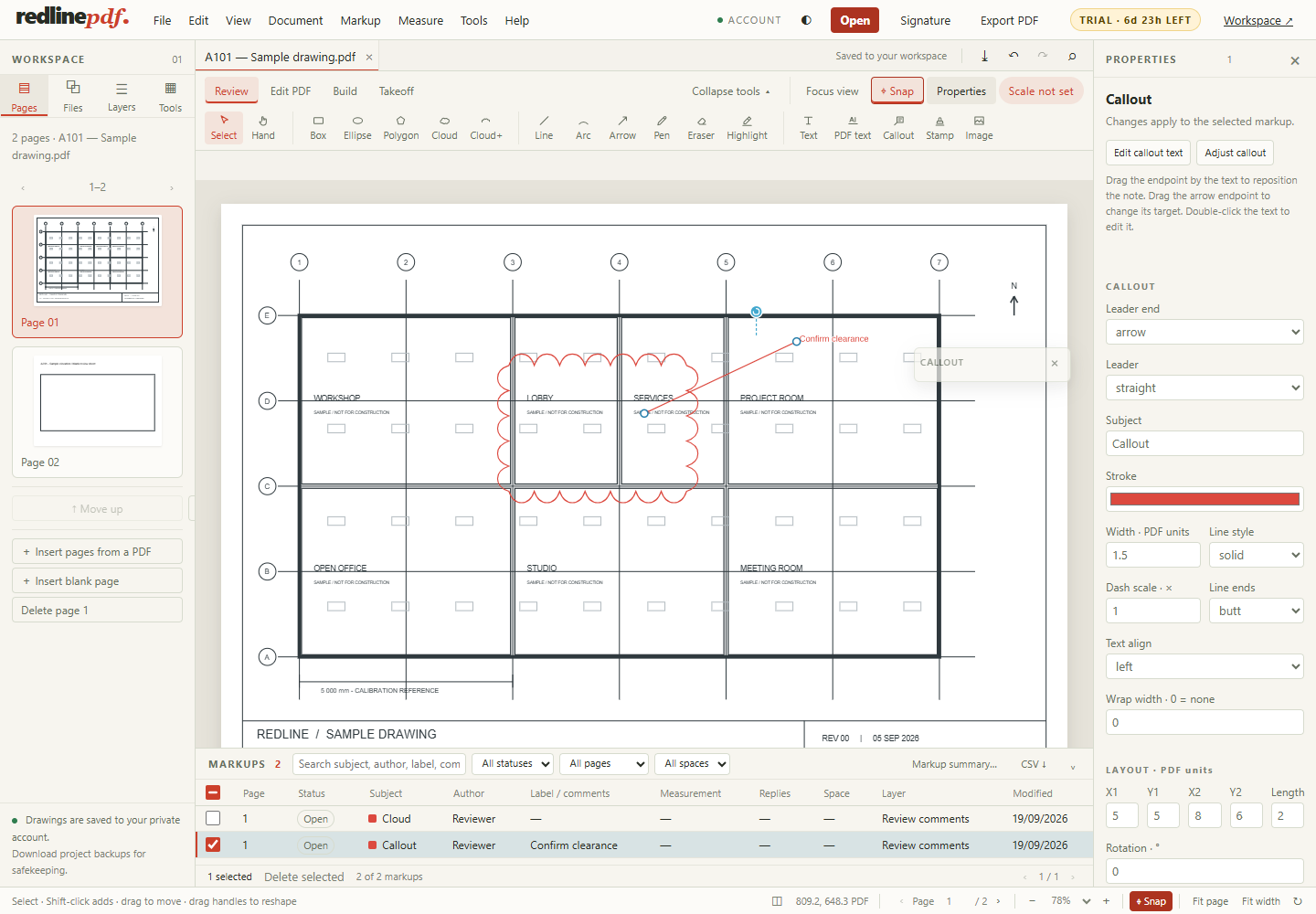
Choosing a PDF review tool is partly about tools and partly about the next person's file. Before moving a workflow, use a non-confidential drawing that represents your normal work: several pages, a rotated sheet, an existing annotation, a dimension and a small quantity schedule. Keep the original file and work on a copy.
- Open and compare. Check the page count, rotation, title block and linework against the original viewer. A successful upload alone is not a visual check.
- Import a known annotation. Inspect its text and appearance. Test a cloud, callout and stamp separately; a flattened shape cannot be expected to behave as the original annotation.
- Calibrate independently. Measure a known dimension on each sheet you will use. Do not assume that another viewer's measurement setting transfers with the file.
- Add a small review. Place a cloud and an actionable note. Change the subject and status, then locate it in the markup list.
- Take off one room. Trace a floor area, deduct an opening, and count a fixture type. Use the worked example to check quantity, waste and rate separately.
- Export both ways. Test editable annotations for continuing the review and a flattened copy for a visual issue. Open both in the tool used by the receiving team.
- Reopen the saved project. Confirm the measurements, notes and quantities remain editable. Check the actual delivery requirements before moving the rest of the project.
What this test cannot prove
One successful file does not establish compatibility with every CAD export, font, annotation subtype or embedded object. Test drawings from the consultants and authoring tools you actually receive. Pay particular attention to scanned plans, complex clipping, unusual page rotations and markups already flattened into the page.
Standard PDF annotation export helps a review travel between tools, but it does not promise to preserve another product's private metadata, custom formulas, session history or tool libraries. Keep native project backups when those matter. Check the current Redline PDF product limits before committing to a workflow.
A practical decision checklist
- Individual review on different computers: try the browser workflow, then test your real file in the trial.
- Takeoff: verify the quantities and units you need, then check the CSV handoff into your own estimating process.
- Team sessions, OCR or batch automation: these are not Redline PDF capabilities. Choose a product that meets those requirements.
- Fixed office standards: ask which PDF deliverables are accepted and run the handoff test before changing tools.
- Occasional markup: compare the Free plan limits with your needs rather than assuming a paid plan is necessary.
This comparison is published by Redline PDF, the maker of one of the products discussed. It is not an independent benchmark or an endorsement from Bluebeam. Vendor-specific facts above link to the vendor's documentation and retain their own check date.
Next guide
Try it on the sample drawing
Redline runs in the browser — nothing to install. Open the demo to try tools on a sample drawing. Demo edits are temporary; your own files, saving, signatures, exporting, printing and downloads come with an account, which starts with 30 days of Pro, no card. Then Free unless you choose Plus or Pro; your drawings stay. Plus is $9 a month or $90 a year; Pro is $15 a month or $150 a year. Compare the plans.
More: all guides